A Piece Of Data Is Not Loading. A First Step In Fixing An Issue
If, for some reason, data is not loading correctly, the first thing you should do is clear your cache. This is also a good first fix attempt for any issue you may be having in relation to something not working as it has before. If the issue still persists, feel free to reach out to one of our many direct customer support methods (Email, Live Chat or by toll free phone).
To do this, please follow these simple steps.
1. Use the quick command of CTRL + SHIFT + DELETE.
Another way of clearing your cache is to:
1. Click the three dots in the top right.
2. Click Settings
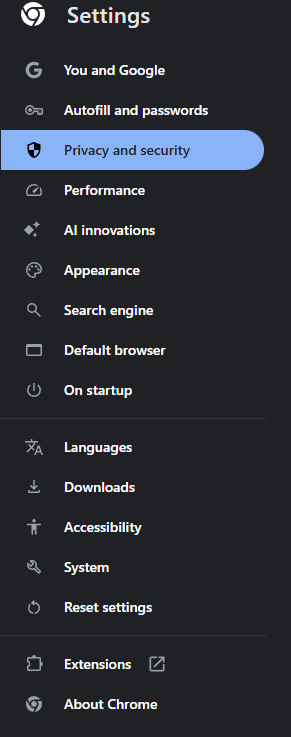
3. Click 'Privacy and Security' on the left
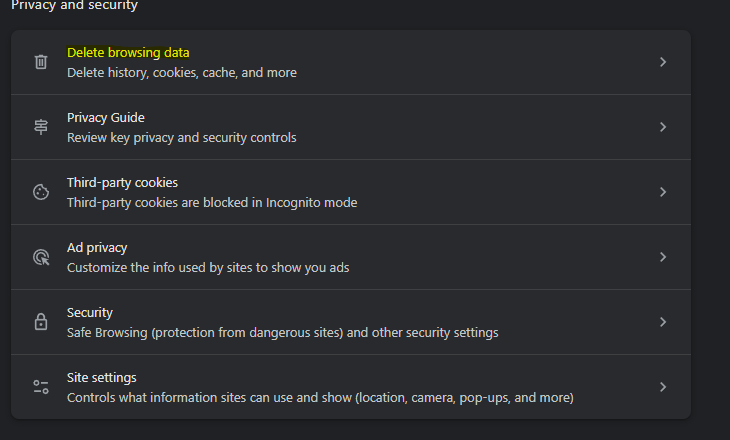
4. Click "Delete browsing data" (Garbage Can Icon)
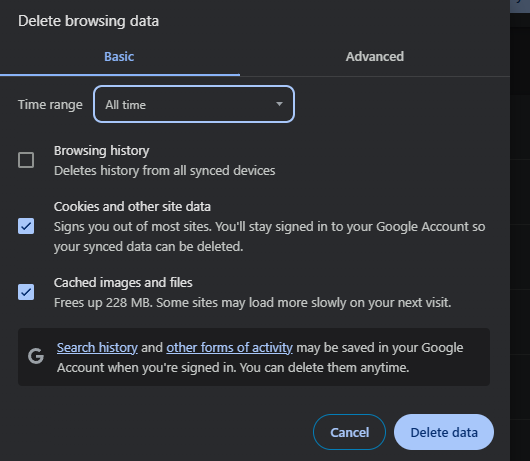
5. Time Range- Select " All Time"
6. Tick off the three boxes in the 'Basic' section
7. Click "Clear Data" (this may take a moment)
8. Go back to Wylie and refresh the page.
Article Number: 72
Author: May 27, 2025
Last Updated: Jun 10, 2025
Online URL: https://help.wyliebiz.com/article.php?id=72